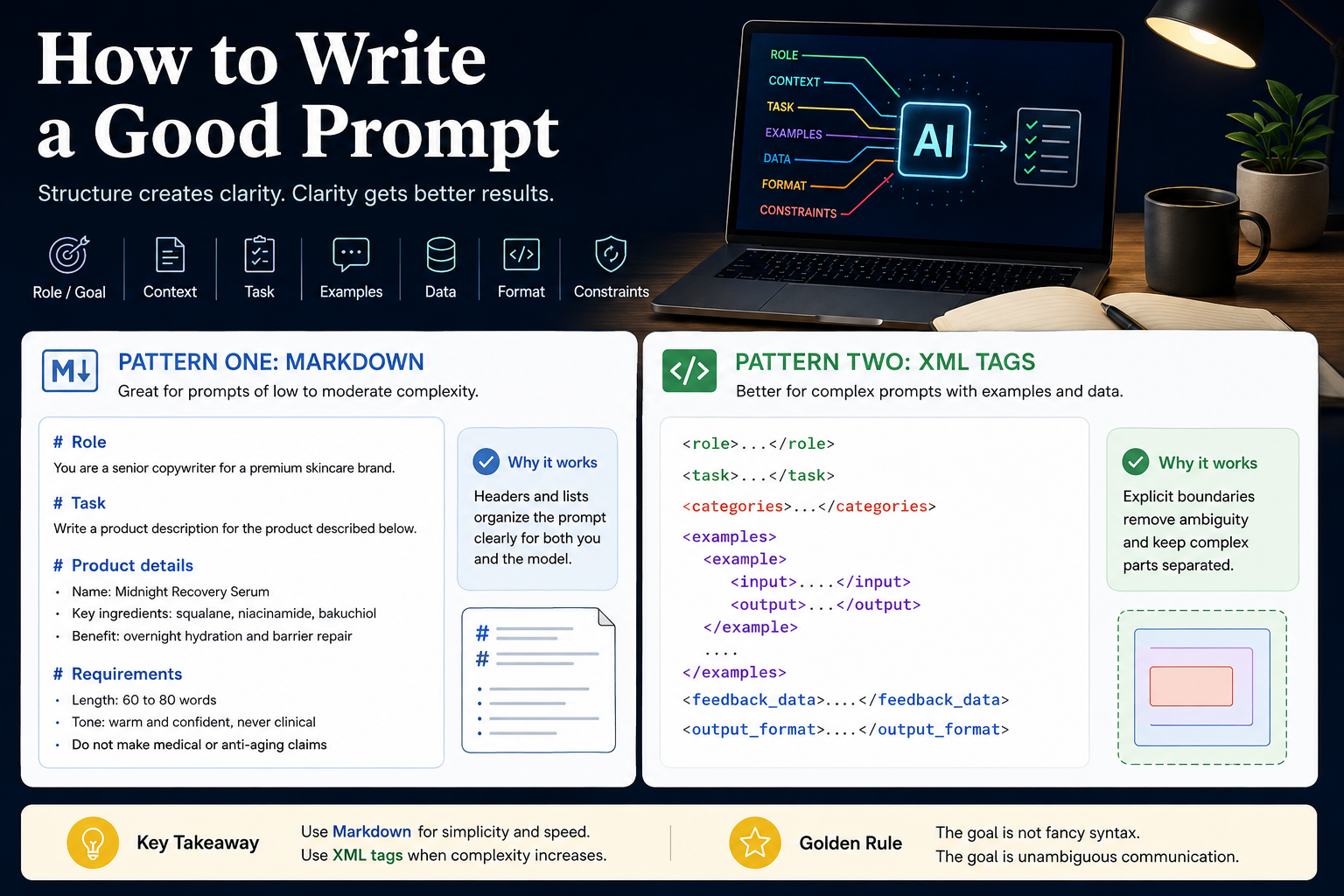

Most advice on prompting stops at "be clear and specific," which is true and not very useful once your request gets complicated. The harder and more practical question is how you organize a prompt, and that is where the difference between a mediocre result and a great one usually lives.
A good prompt clearly states what you want, gives the model the context it needs, shows it an example where useful, specifies the format of the answer, and names anything to avoid. Once a prompt contains more than one or two of those parts, how you structure and separate them starts to matter as much as what they say. The two most common ways to give a prompt that structure are Markdown and XML-style tags. Markdown is the right default for most prompts. XML becomes the better choice as a prompt grows complex, because its explicit boundaries remove the ambiguity that creeps in when many pieces share one block of text.
This piece assumes you already know why prompting matters. If you want that foundation first, start with What Is Prompt Engineering, then come back here for the mechanics.
The parts of a good prompt
Before structure, a quick inventory of what you are usually structuring. A well-formed prompt for any non-trivial task tends to contain some combination of a role or goal that frames how the model should approach the work, the context and background it cannot otherwise know, the task itself stated plainly, one or more examples of what good looks like, the data or material to work on, the format the answer should take, and the constraints or things to avoid. Not every prompt needs all of these. The point is that as soon as you have several of them in play, the model needs to be able to tell them apart, and that is a job for structure.
Pattern one: Markdown
Markdown organizes a prompt with headers and lists, the same way you would structure a readable document. It is lightweight, easy to write, and easy for a human to scan, which makes it an excellent default for prompts of low to moderate complexity.
Here is a moderately structured prompt written in Markdown:
# RoleYou are a senior copywriter for a premium skincare brand.# TaskWrite a product description for the product described below.# Product details- Name: Midnight Recovery Serum- Key ingredients: squalane, niacinamide, bakuchiol- Benefit: overnight hydration and barrier repair# Requirements- Length: 60 to 80 words- Tone: warm and confident, never clinical- Do not make medical or anti-aging claims
This is clear, and a capable model will handle it well. The headers give each part a label, the lists keep details tidy, and anyone reading it understands the request at a glance. For a great many everyday prompts, this is all the structure you need, and reaching for anything heavier would just add noise.
Pattern two: XML tags
XML-style tags organize a prompt by wrapping each part in a named, explicitly opened and closed container, like <context> and </context>. The tag names are arbitrary, but choosing clear, descriptive ones makes the prompt easy to follow. Several model developers, Anthropic among them, specifically recommend this approach for organizing complex prompts, because models are good at recognizing where a tagged section starts and ends.
Here is a more complex task, one with embedded examples and embedded data, written with tags:
<role>You are a support operations analyst who categorizes customer feedback accurately and concisely.</role><task>Classify each item in <feedback_data> into exactly one category from <categories>, then return the result in the format described in <output_format>.</task><categories>- Bug: something is broken or behaving incorrectly- Feature Request: a request for new or changed functionality- Praise: positive feedback that needs no action- Billing: anything about payments, invoices, or refunds</categories><examples> <example> <input>I was charged twice this month, can someone look into it?</input> <output>{"category": "Billing"}</output> </example> <example> <input>It would be great if I could export my data to CSV.</input> <output>{"category": "Feature Request"}</output> </example></examples><feedback_data>1. The dashboard will not load on Safari.2. Honestly the best tool we have used all year.3. Why was I billed before my trial ended?</feedback_data><output_format>Return a JSON array with one object per item, each containing "id" and "category".Return only the JSON, with no surrounding commentary.</output_format>
Even at a glance, this prompt has parts the Markdown version did not need to manage: examples that each pair an input with an output, a block of real data to process, and instructions that refer to other sections by name. That combination is exactly where tags start to earn their slightly heavier syntax.
Why XML is better for complex prompts
The advantage of tags comes down to removing ambiguity, and it shows up in four concrete ways.
The first is unambiguous boundaries. A Markdown header marks where a section begins, but nothing marks where it ends. The section simply runs until the next header, which the model has to infer. A closing tag states the end explicitly, so there is no guessing where your context stops and your instructions start.
The second is safe embedding of messy content. The moment you paste real material into a prompt, a support ticket, a document, a block of code, that material may contain its own headers, hashes, lists, or punctuation. In a Markdown-structured prompt, that content can collide with your own headers and blur the structure. Wrapping it in <feedback_data> tags cleanly seals it off, so the model never confuses the data it is working on with the instructions about how to work on it. Notice that the feedback in the example above contains a numbered list, which in a Markdown prompt could easily be mistaken for part of the prompt's own structure.
The third is clean nesting. Complex prompts often have structure inside structure, such as several examples that each contain an input and an output. Tags nest naturally and stay legible, where trying to express the same nesting with layers of Markdown headings becomes confusing quickly.
The fourth is precise reference. Because each section has a name, your instructions can point to other sections directly, as the task above does when it tells the model to classify the items in <feedback_data> using the <categories>. That kind of pointing is far harder to do reliably when sections are only separated by headers. It also means that if you later assemble the prompt programmatically, you can drop new content into the right tag without any risk of breaking the overall structure, and you can ask for tagged output that is just as easy to parse on the way back out.
A rule of thumb
The goal is not to use the most structure you can. It is to use the lightest structure that removes ambiguity. For a short, single-part request, plain prose is fine and any formatting is overhead. For a moderate prompt with a few clear sections, Markdown is clean and readable and usually the right call. When a prompt grows long, embeds real content, carries nested examples, or needs its sections to refer to one another, that is the signal to reach for tags. The same instinct applies when you plan larger work for an AI agent rather than a single answer, which is why we suggest drafting project plans in markdown or XML in How to Vibe Code Like a Senior Engineer. Match the structure to the complexity, and let the prompt stay as simple as the task allows.
Frequently asked questions
What is the difference between using Markdown and XML in a prompt? Markdown structures a prompt with headers and lists, which is lightweight and readable and works well for simple to moderate prompts. XML uses named, explicitly closed tags to wrap each part, which gives clearer boundaries and is better suited to complex prompts with embedded content or nested examples.
Why is XML better for complex prompts? XML tags mark exactly where each section begins and ends, safely contain pasted content that might otherwise collide with your formatting, nest cleanly for things like multiple examples, and let instructions refer to sections by name. Together these remove the ambiguity that grows as a prompt gets more complex.
Should I always use XML tags in my prompts? No. For short or moderately complex prompts, plain prose or Markdown is clearer and adds less clutter. Tags are worth their extra syntax once a prompt is long, contains embedded data, has nested structure, or needs its parts to reference one another.
Do the XML tag names need to be specific words? The tag names are arbitrary, so you can name them whatever fits, but clear and descriptive names such as context, examples, and output_format make the prompt easier to read and easier for the model to follow. Whatever you choose, keep the names consistent and remember to close every tag.
Does this work with any AI model? Both patterns work with the major current models, and several developers explicitly recommend XML-style tags for structuring complex prompts. As always, the best approach is the lightest structure that makes your intent unambiguous for the model you are using.